



Table of Contents
Introduction

If you’ve ever looked at your Search Term Report and seen your budget disappearing on clicks that have zero chance of buying, you know the “leaking bucket” feeling. Most sellers think more traffic is better, but in the world of Amazon PPC negative keywords, the traffic you don’t get is what actually makes you profitable.
If you are wondering how to find negative keywords for Amazon FBA, you have to stop looking for “bad words” and start looking for “bad intent.”
The Reality of Negative Keywords
Simply put, negative keywords are your way of telling Amazon, “Don’t show my ad if the shopper types this.” It’s the only way to protect your margins from broad match chaos.
Real-World Examples of Negative Keywords:
- The “Material” Filter: If you sell premium “Stainless Steel Straws,” you should negate the word plastic.
- The “Sizing” Filter: If you sell “Large Dog Beds,” you need to block small or puppy immediately.
- The “Competitor” Drain: If you aren’t ready to bid on high-cost brand names, those brands belong in your Amazon negative keywords list to keep your ACoS from spiking.
How to Find Negative Keywords for Amazon FBA (The Pro Workflow)
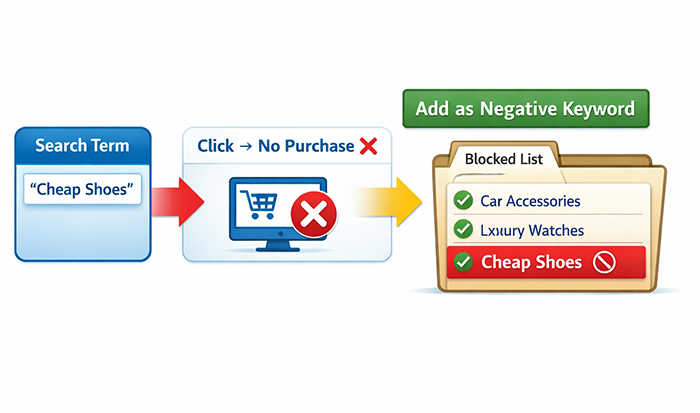
Forget the generic lists you find online. Your best data is already sitting in your Seller Central account.
- The “Zero Conversion” Deep Dive: Download your Search Term Report for the last 60 days. Filter for terms that have had more than 10–15 clicks but zero sales. These are your primary candidates for Amazon PPC negative keywords. If 15 people clicked and nobody bought, the “intent” doesn’t match your product.
- The High ACoS Cull: Look for terms where the ACoS is double your profit margin. Even if they are selling, they are “bleeding” you. Moving these to a negative exact list can instantly stabilize your campaign.
- Google Search Console / Auto-Fill: Start typing your product name into the Amazon search bar. See what irrelevant suggestions pop up. If you sell “Blue Pens” and Amazon suggests “Blue Pens Erasable,” but yours aren’t erasable, erasable goes on your negative list before you even launch.
Negative Exact vs. Negative Phrase
A quick rule of thumb for your strategy:
- Negative Exact: Blocks that specific, single term (e.g., “cheap blue pens”).
- Negative Phrase: Blocks any search containing that phrase (e.g., blocking “free” will stop “free pens,” “pens for free,” etc.).
What Are Negative Keywords, Really?
Think of negative keywords as your “Do Not Disturb” sign for the Amazon algorithm.
When you run a campaign, Amazon’s job is to spend your money by finding traffic. The problem? The algorithm isn’t always smart. It sees “Leather Wallet” and thinks you want to show up for everything related to that, even the bargain-bin searches that will never buy your $50 premium product.
By using Amazon negative keywords, you are manually overriding the algorithm. You are telling Amazon: “I know you think this shopper is a match, but they aren’t. Don’t show them my ad, and don’t charge me for that click.”
Why This is the "Secret Sauce" for Profitability

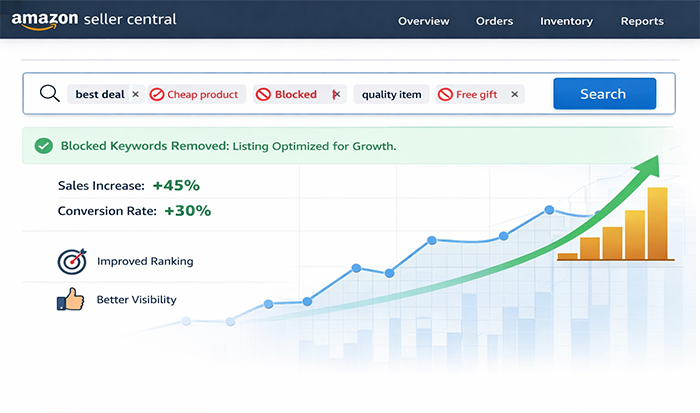
In any Amazon PPC negative keywords strategy, you aren’t just filtering traffic; you’re protecting your conversion rate. When you block the wrong people, your Click-Through Rate (CTR) goes up, your conversion rate improves, and eventually, Amazon rewards you with better organic rankings because you’re proving your product is highly relevant.
Common Examples of Negative Keywords
- The “Bargain Hunter” Block: If your brand is high-end, terms like cheap, clearance, discount, or used are your worst enemies.
- The “Wrong Material” Block: If you sell genuine leather, you need to negative faux, synthetic, plastic, or vegan.
- The “Mismatched Intent” Block: If you sell men’s wallets, you should immediately block women’s, kids, purse, or clutch.
The Practical Side: How to Find Negative Keywords for Amazon FBA
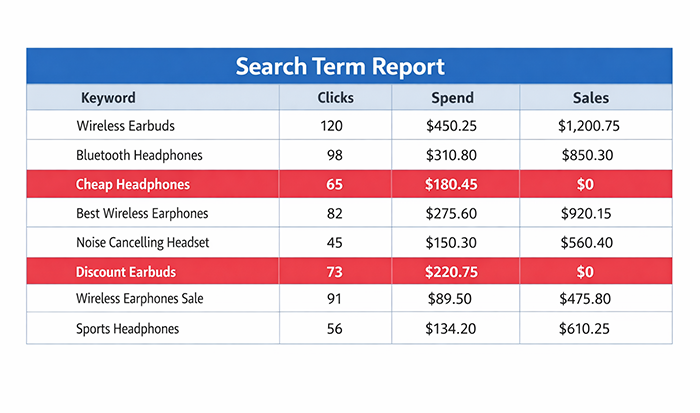
The best way to build this list isn’t by guessing; it’s by looking at where your money has already gone to die.
- The “Lurker” Search Terms: Open your search term report. Look for words that appear in dozens of different searches but never result in a sale. That specific word is a “root” negative.
- The Competitor “Sinkhole”: Sometimes you’ll find you’re appearing for a massive brand name (like Montblanc or Fossil). If you’re a smaller seller, you’re likely just paying for people to “window shop” your ad before buying the big brand. Adding these as Amazon PPC negative keywords can save you hundreds in a single week.
At the end of the day, mastering how to find negative keywords for Amazon FBA is the difference between a business that just “makes sales” and a business that actually makes a profit.
You want to spend your budget on the 100 people who are ready to buy, not the 1,000 people who are just browsing.
Why Amazon Negative Keywords Are Your Secret Weapon for Profitability

In a marketplace as crowded as Amazon, being “seen” isn’t the goal, being seen by the right person is. If you treat your PPC like a net, you’re going to catch a lot of trash along with the fish. Negative keywords are the tool that lets the trash slip through so you only pay for the keepers.
If you are still learning how to find negative keywords for Amazon FBA, you need to realize that this isn’t just a “task” on a checklist. It is the most direct way to stop Amazon from eating your profit margins.
The Real-World Impact of a Clean Keyword List
When you get aggressive with Amazon negative keywords, you aren’t just “optimizing”, you’re performing surgery on your ad spend. Here’s how that actually changes your business:
You stop paying for "curiosity" clicks
We’ve all seen it when someone searches for something vaguely related to your product, clicks out of habit, realizes it’s not what they wanted, and leaves. That click cost you $1.50. Multiply that by a thousand “curious” shoppers, and your budget is gone by noon. Amazon PPC negative keywords kill those clicks before they happen.
Your conversion rate finally makes sense
When your ads only show up for high-intent shoppers, your conversion rate naturally spikes. Amazon’s algorithm notices this. The more you convert, the better your organic ranking becomes. It’s a ripple effect that starts with a solid negative list.
You regain control from the "Auto" trap
We all use Auto campaigns to harvest data, but they are notorious for bidding on nonsense. By constantly updating your examples of negative keywords, you “train” the Auto campaign to stay in its lane, lowering your ACoS without having to slash your bids.
Better CTR (Click-Through Rate)
If your ad for “Stainless Steel Water Bottles” shows up for someone searching “Plastic Gallon Jugs,” they won’t click, or worse, they’ll click and be disappointed. By filtering out the wrong audience, your CTR stays high, which tells Amazon your ad is highly relevant.
The “AI giveaway” in this section is the “Definition -> Example -> Rule” structure. It’s too formulaic. When an actual Amazon seller explains this, they focus on the risk, specifically how one wrong “Phrase” match can accidentally kill your best-selling traffic.
The Two Flavors of Negative Keywords (And How Not to Break Your Campaigns)
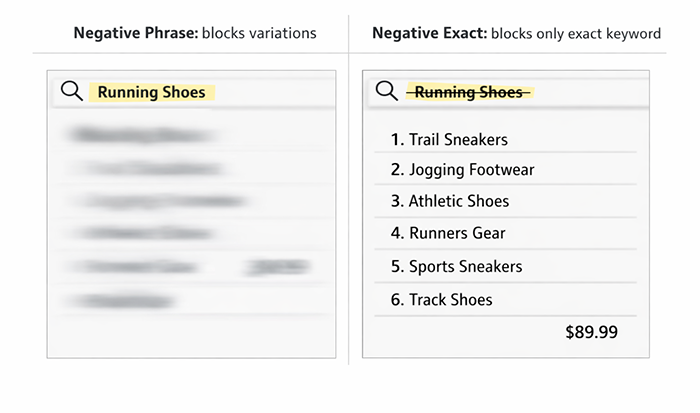
Choosing between match types is where most sellers get nervous. If you’re too broad, you kill your reach; if you’re too specific, you keep bleeding cash. Understanding the nuance is a massive part of learning how to find negative keywords for Amazon FBA effectively.
In the world of Amazon PPC negative keywords, you have two main tools: the scalpel (Exact) and the sledgehammer (Phrase).
Negative Exact: The Scalpel
This is for when a very specific search term is killing your ACoS, but the individual words within it are still valuable.
- How it works: Amazon only blocks the ad if the shopper types that exact string of words in that exact order, with nothing else.
- Real-World Example: Let’s say you sell a “high-end leather wallet.” You might find that the term “men’s wallet” is way too competitive and expensive for you right now. You would set “men’s wallet” as Negative Exact.
- The Result: You won’t show up for “men’s wallet,” but you will still show up for “slim men’s wallet” or “men’s wallet leather.” It’s precise control.
Negative Phrase: The Sledgehammer
This is for those “poison” words that, no matter what they are attached to, will never result in a profitable sale for you.
- How it works: If those words appear in the search query in that order, your ad is blocked. It doesn’t matter what comes before or after.
- Real-World Example: If you don’t sell cheap products, “cheap” is a poison word. You should add it to your Amazon negative keywords as a Phrase Match.
- The Result: This blocks “cheap wallet,” “cheap leather wallets for men,” and “where to buy cheap wallets.” You’ve effectively cleaned up dozens of potential bad searches with one move.
When to Use What? (The "Safe" Strategy)
If you’re looking for examples of negative keywords to add to your list right now, follow this logic:
- Use a negative Phrase for attributes your product simply doesn’t have. If your wallet isn’t “waterproof,” “pink,” or “velcro,” add those as phrases. There is no scenario where a “pink velcro wallet” search helps your leather wallet brand.
- Use Negative Exact for “high-competition” terms that are just too pricey. Maybe “wallet” is a term you could rank for, but the $4.00 CPC is eating your lunch. Use Exact match to opt out of that specific bidding war while keeping your long-tail opportunities open.
Mastering these two types is the “secret sauce” in how to find negative keywords for Amazon FBA that actually stick. One keeps your budget from exploding, and the other keeps your targeting laser-focused.
This is the part where most sellers get overwhelmed and just “set and forget” their campaigns. But if you want to actually see a profit at the end of the month, knowing how to find negative keywords for Amazon FBA is the most important skill you can have.
Forget the generic AI lists; here is how a real human strategist breaks down a Search Term Report to find the “money pits.”
The Step-by-Step Blueprint: How to Find Negative Keywords for Amazon FBA
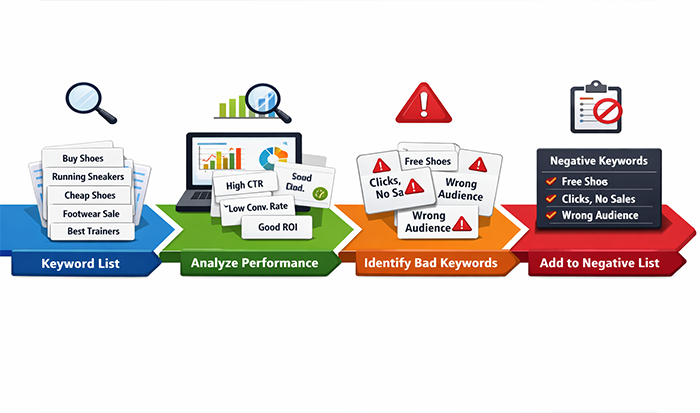
You don’t need fancy software to do this, you just need to look at your data with a critical eye. Here is the workflow I use to clean up Amazon PPC negative keywords every single week.
The "Click-and-Quit" Audit (Search Term Reports)
Download your Search Term Report for the last 30 or 60 days. This is your “goldmine” for identifying waste. Filter your spreadsheet by clicks (highest to lowest) and look for anything that has 15–20 clicks but zero sales.
If 20 people clicked and nobody bought, it’s not a “maybe”, it’s a “no.” These are your primary candidates for Amazon negative keywords.
Spotting the "Liar" Keywords (Intent Mismatch)
Sometimes a keyword looks relevant on paper, but the shopper’s intent is totally different.
- The “Material” Trap: If you sell high-end Japanese steel knives, and you see “German steel knives” in your report, you might think, “Well, they want knives!” * The Reality: No, they want a specific type of knife.
If they click yours and see it’s Japanese steel, they’ll bounce. Add “German” to your negative keywords list immediately.
The "Poison" Word Patterns (N-Gram Analysis)
Don’t just look at full phrases; look for recurring single words that keep appearing in failing searches.
- If you see “free,” “used,” “cheap,” or “repair” popping up across multiple different search terms that aren’t converting, those are your “Poison Words.”
- Add these as Negative Phrase matches to kill off hundreds of bad variations at once.
Harvesting the "Auto-Campaign" Losers
Auto campaigns are great for discovery, but they are also “budget eaters.” Once a week, go into your Auto campaign data.
- The Winners: Move these to a Manual campaign.
- The Losers: Don’t just let them sit there. Every irrelevant term an Auto campaign finds should be added to your Amazon PPC negative keywords list for that specific ad group.
The Pro-Level Playbook: Advanced Amazon PPC Negative Keywords
Once you’ve mastered the basics of how to find negative keywords for Amazon FBA, you need to stop thinking about “deleting bad words” and start thinking about “traffic control.”
Advanced sellers use negative keywords to build a wall between their campaigns so they don’t end up bidding against themselves.
The Keyword Isolation Strategy (The "Clean Migration")
The biggest mistake I see sellers make is finding a winning keyword in an Auto campaign and moving it to a Manual campaign, but then leaving it running in both.
The Fix: When you “graduate” a high-converting term from Auto to Manual, you must add that exact term as one of your Amazon PPC negative keywords in the Auto campaign.
- Why? This forces the Auto campaign to go find new data instead of lazily spending your budget on the winner you’ve already found. It keeps your campaigns from cannibalizing each other.
The MECE Framework (Keeping Your Data "Clean")
MECE stands for Mutually Exclusive, Collectively Exhaustive. In plain English: it means every keyword has exactly one home.
If you have a campaign for “Leather Wallets” and another for “Travel Wallets,” you need to cross-pollinate your Amazon negative keywords.
- Add “travel” as a negative in your “Leather” campaign.
- Add “leather” as a negative in your “Travel” campaign.
- The Result: When you look at your data, you know exactly which product is driving which sale. No overlapping data, no “guessing” which ad triggered the click.
Funnel-Based Negative Structures
Think of your PPC like a funnel. You want your “Broad” campaigns at the top catching everything, and your “Exact” campaigns at the bottom closing the deal.
To make this work, you use negative keywords as “gatekeepers” between the levels:
- The Top (Broad/Auto): Add your high-performing “Exact” keywords as negatives here. You don’t want the broad algorithm messing with your proven winners.
- The Middle (Phrase): Use these to capture variations, but keep your examples of negative keywords ready for any “garbage” phrases that creep in (like “cheap” or “DIY”).
- The Bottom (Exact): This is where you spend the big bucks on high-intent traffic.
Advanced "Competitor Sniping"
We’ve all seen those Amazon negative keywords that belong to huge brands. If you are a new seller, bidding on “Nike” or “Apple” is a suicide mission, your ACoS will be 400%.
- The Pro Move: Instead of just hoping you don’t show up for them, proactively hunt for high-volume competitor brand names and add them to your negative list.
This keeps your budget focused on “unbranded” shoppers who are actually open to trying a new brand like yours.
Conclusion
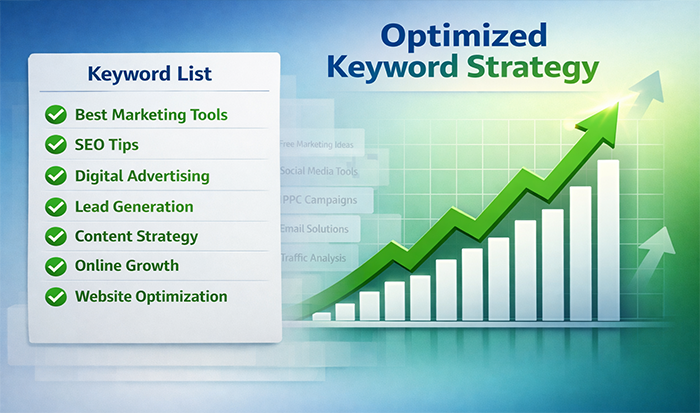
Knowing how to find negative keywords for Amazon FBA isn’t a one-time setup; it’s a maintenance habit. Every Monday, you should be looking for “The Bleeders”, terms with high spend and zero ROI, and moving them straight to your negative list.
By the time you’ve implemented these advanced strategies, your Amazon negative keywords won’t just be a list of “bad words”; they will be the structural pillars that keep your PPC profitable while your competitors are still “pouring money into a leaking bucket.”
FAQs:
1. How often should I update my Amazon negative keywords?
If you’re scaling, audit weekly to stop profit “bleeders” fast. For stable campaigns, a monthly deep dive is enough to catch irrelevant or seasonal junk traffic.
2. When is a keyword officially a "loser" that needs to be negated?
Use the 20-click rule: if a search term gets 20 clicks with no sales, it’s likely a mismatch. If CPC is high, cut it at 10–12 clicks to protect ACoS, don’t wait for 50.
3. Should I add competitor brand names as negative keywords?
Only if they’re not converting. Competitor bidding (“conquesting”) is expensive if a competitor term has high spend and no ROI, negate it. Don’t pay for brand-loyal traffic you can’t convert.
4. Can negative keywords hurt my organic ranking?
Technically, no. Negative keywords only block paid ads. They can even help organic rank by filtering out low-intent traffic improving conversion rates, which Amazon rewards with better rankings.
5. What’s the biggest mistake to avoid with Amazon negative keywords?
Avoid aggressive phrase-match negatives on core terms. For example, if you sell “leather wallets,” don’t negate “wallet” or you’ll shut down all ads. Use phrase match only for irrelevant “poison” words like “free,” “used,” or “cheap.”


 Back to top
Thought Leadership, Tips, and Tricks
Never miss insights into the Amazon selling space by signing up for our email list!
